 Hire Logix Labs
A ranked portfolio
Score every loaded match before reviewing the top 25. The workbook shows loaded and displayed counts separately. Selections above 25,000 matches must be narrowed; results are not silently truncated.
Build a focused campus outreach shortlist across 390 four-digit program groups. Start with a hiring role or select programs, then compare completions, later earnings, distance and growth.
$49 Secure checkout and download through Gumroad.
Tested with Microsoft 365 Excel for Windows. Check requirements before purchase.
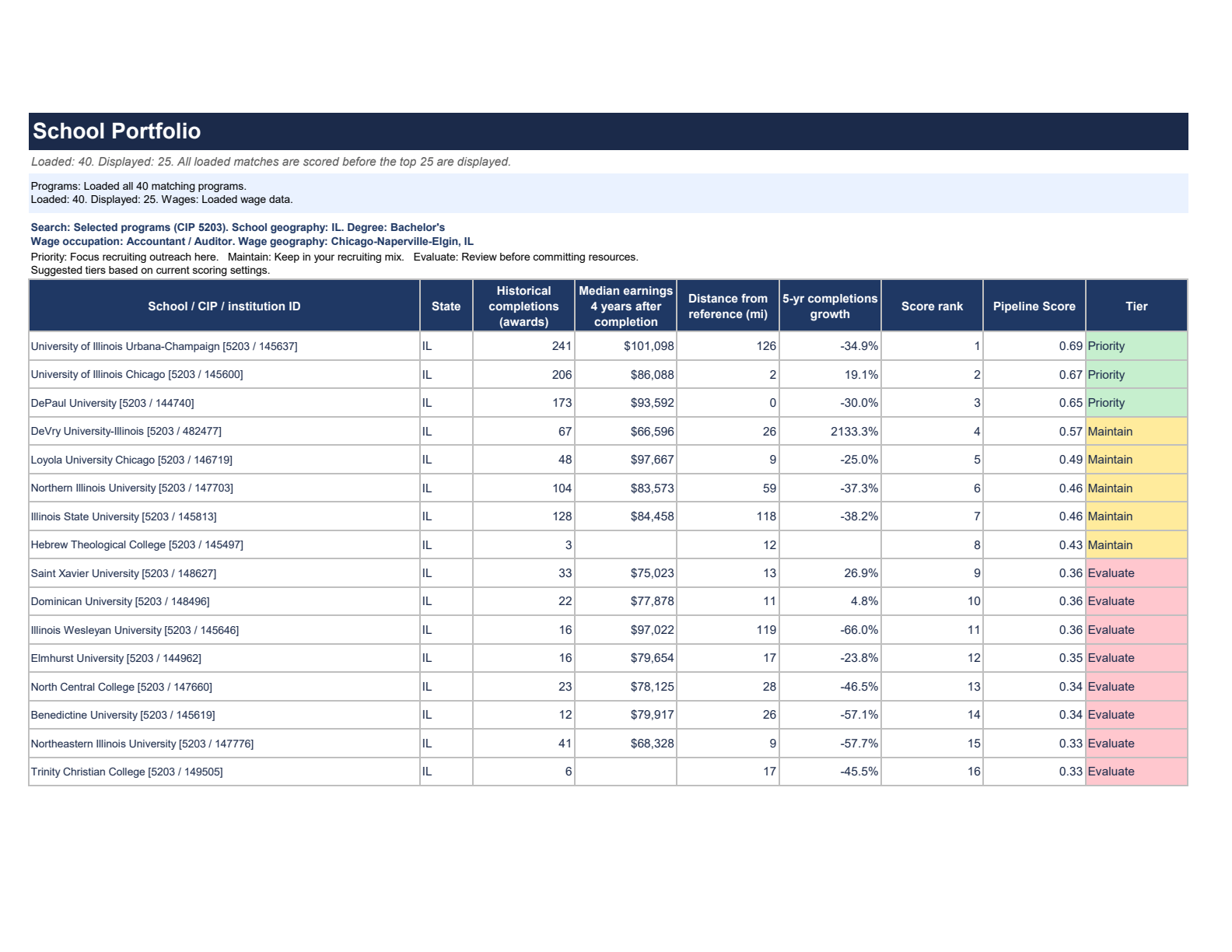
Score every loaded match before reviewing the top 25. The workbook shows loaded and displayed counts separately. Selections above 25,000 matches must be narrowed; results are not silently truncated.
Keep simple role-based search, choose up to five program groups in Advanced, or search all programs. Filter associate, bachelor or master degrees by state or All U.S. (50 states plus DC).
Choose occupational wage context independently from school geography: a supported metro, state/DC or the United States. These wage benchmarks are separate from earnings four years after program completion.
| Worksheet / area | What you use it for |
|---|---|
| Setup | Hiring role, state or All U.S. school search, degree, optional reference coordinates, independent wage geography and license. |
| School Portfolio | Ranked program results and the signals behind them. |
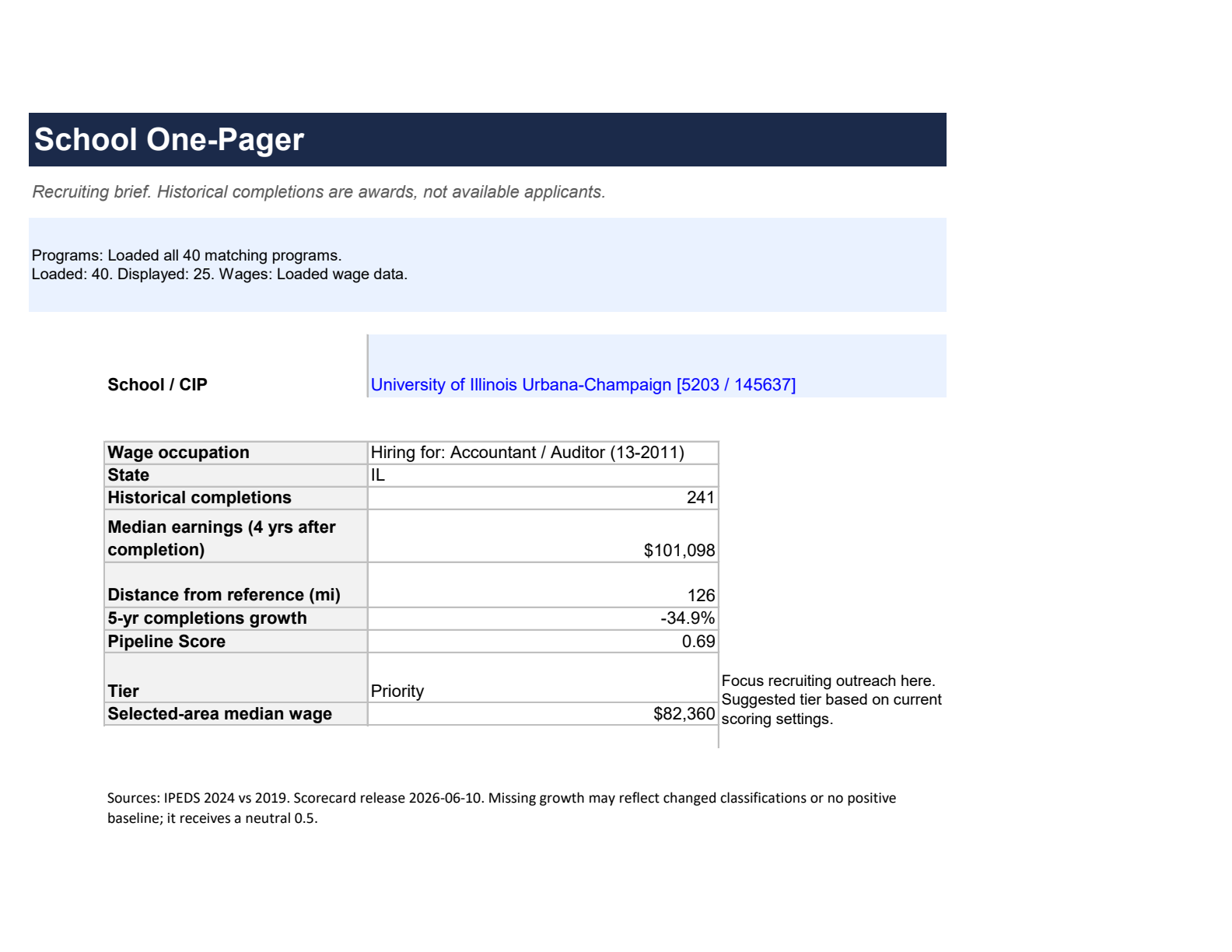
| School One-Pager | A focused view of a selected school/program. |
| Offer Calibration | Occupational wage context, separate from graduate earnings outcomes. |
| Advanced and README | Role, selected-program and all-program modes; ranking weights, methodology and setup guidance. |
The School One-Pager brings a selected program’s completions, later earnings, distance, growth and suggested tier into one view.
This Accounting example uses University of Illinois Urbana-Champaign. The Priority explanation reflects the current scoring settings. Chicago’s occupational median wage is a separate benchmark, not a starting-salary recommendation.
Review the instructions, then start with a role or choose programs in Advanced. The included example is Accounting in Illinois with Chicago wages.
Paste your purchase license on Setup, then choose Data → Refresh All. You do not need your own federal API keys.
Check refresh status, source periods and loaded/displayed counts before using the results. Changing a program, degree or geography requires Refresh All.
Coverage includes 390 available four-digit CIP program groups across associate, bachelor and master degrees. Certificates and doctorates are excluded; available records and outcomes vary by program. All U.S. means 50 states plus DC, with other jurisdictions distinct. Missing or tied scoring factors receive a neutral 0.5; missing earnings or growth are not zero. IPEDS completions are historical awards, not available applicants. College Scorecard earnings are measured four years after completion, not starting pay. Rankings are recruiting preferences, not a measure of school or student quality. Sources: IPEDS 2024 completions with a 2019 comparison; College Scorecard release June 10, 2026. BLS wage source years appear in the workbook.
Campus Intelligence · Excel workbook
Secure checkout and download through Gumroad.
Try it with your recruiting workflow. If it isn’t right for you, request a full refund within 30 days of purchase.
Applies to individual products and the bundle. Read the refund policy or contact support.